> ## Documentation Index
> Fetch the complete documentation index at: https://docs.kadoa.com/llms.txt
> Use this file to discover all available pages before exploring further.
# Data Quality
> View per-field validation rules and platform metrics for a workflow, and edit rules from the dashboard
The **Data quality** tab in the workflow sidebar shows the quality state for the currently selected run and is also where you edit per-field rules.
## Workflow Data Quality
1. Go to [Workflows](https://www.kadoa.com/dashboard) and click on a workflow
2. In the right sidebar, open the **Data quality** section.
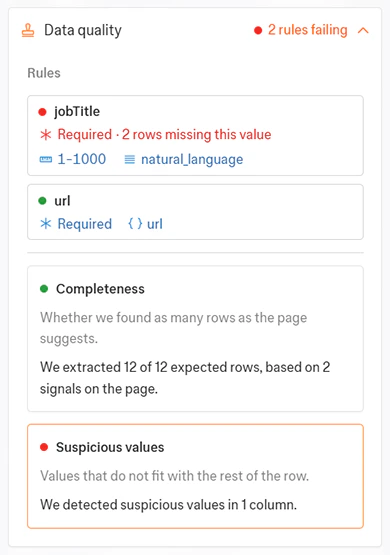 The section has two areas, top to bottom:
* **Rules**: One row per schema field that supports validation, with the configured checks summarized.
* **Platform metrics**: Built-in metrics Kadoa computes automatically.
While the section is open, the data rows on the left are filtered to only show rows with data quality issues.
## Rules
Each row represents one schema field:
* The status dot is green when all of that field's rules passed on the current run, red when any rule failed, and absent when no rules are configured.
* The chips after the field name summarize the configured checks, for example **Presence ≥ 80%**, **Format url**. Failing chips turn red.
### Edit a field's rules
Click any field row to open the dialog to edit rules. You can read about the different kind of available rules [in the getting started guide](/docs/data-quality).
The section has two areas, top to bottom:
* **Rules**: One row per schema field that supports validation, with the configured checks summarized.
* **Platform metrics**: Built-in metrics Kadoa computes automatically.
While the section is open, the data rows on the left are filtered to only show rows with data quality issues.
## Rules
Each row represents one schema field:
* The status dot is green when all of that field's rules passed on the current run, red when any rule failed, and absent when no rules are configured.
* The chips after the field name summarize the configured checks, for example **Presence ≥ 80%**, **Format url**. Failing chips turn red.
### Edit a field's rules
Click any field row to open the dialog to edit rules. You can read about the different kind of available rules [in the getting started guide](/docs/data-quality).
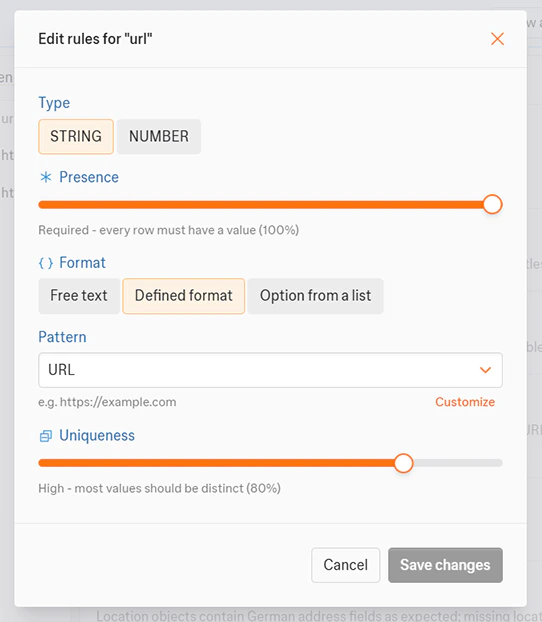 Rule changes take effect on the **next** run. The currently displayed results are unaffected until you trigger another run.
## Platform metrics
Kadoa currently offers the following built-in platform metrics. You can click any card to open a detail view.
* **Completeness**: reports whether we found as many rows as the page suggests. The detail view shows the contributing signals.
* **Suspicious values**: reports values that do not fit with the rest of the row. The detail view shows the flagged columns with example values.
## Template-managed workflows
When a workflow is linked to a template that owns its data quality rules, rules can not be edited in the workflow.
To change rules, edit the template (and publish a new version), or unlink the workflow from its template.
## Learn more
* [Data quality concepts →](/docs/data-quality)
* [API reference →](/api-reference/data-quality/get-rules)
Rule changes take effect on the **next** run. The currently displayed results are unaffected until you trigger another run.
## Platform metrics
Kadoa currently offers the following built-in platform metrics. You can click any card to open a detail view.
* **Completeness**: reports whether we found as many rows as the page suggests. The detail view shows the contributing signals.
* **Suspicious values**: reports values that do not fit with the rest of the row. The detail view shows the flagged columns with example values.
## Template-managed workflows
When a workflow is linked to a template that owns its data quality rules, rules can not be edited in the workflow.
To change rules, edit the template (and publish a new version), or unlink the workflow from its template.
## Learn more
* [Data quality concepts →](/docs/data-quality)
* [API reference →](/api-reference/data-quality/get-rules)